
TL;DR
A major prospect requested we turn our Kanban-style triage list into a table view — to match their previous software.
Before making any changes, we interviewed both the prospect and existing clients to understand their actual needs.
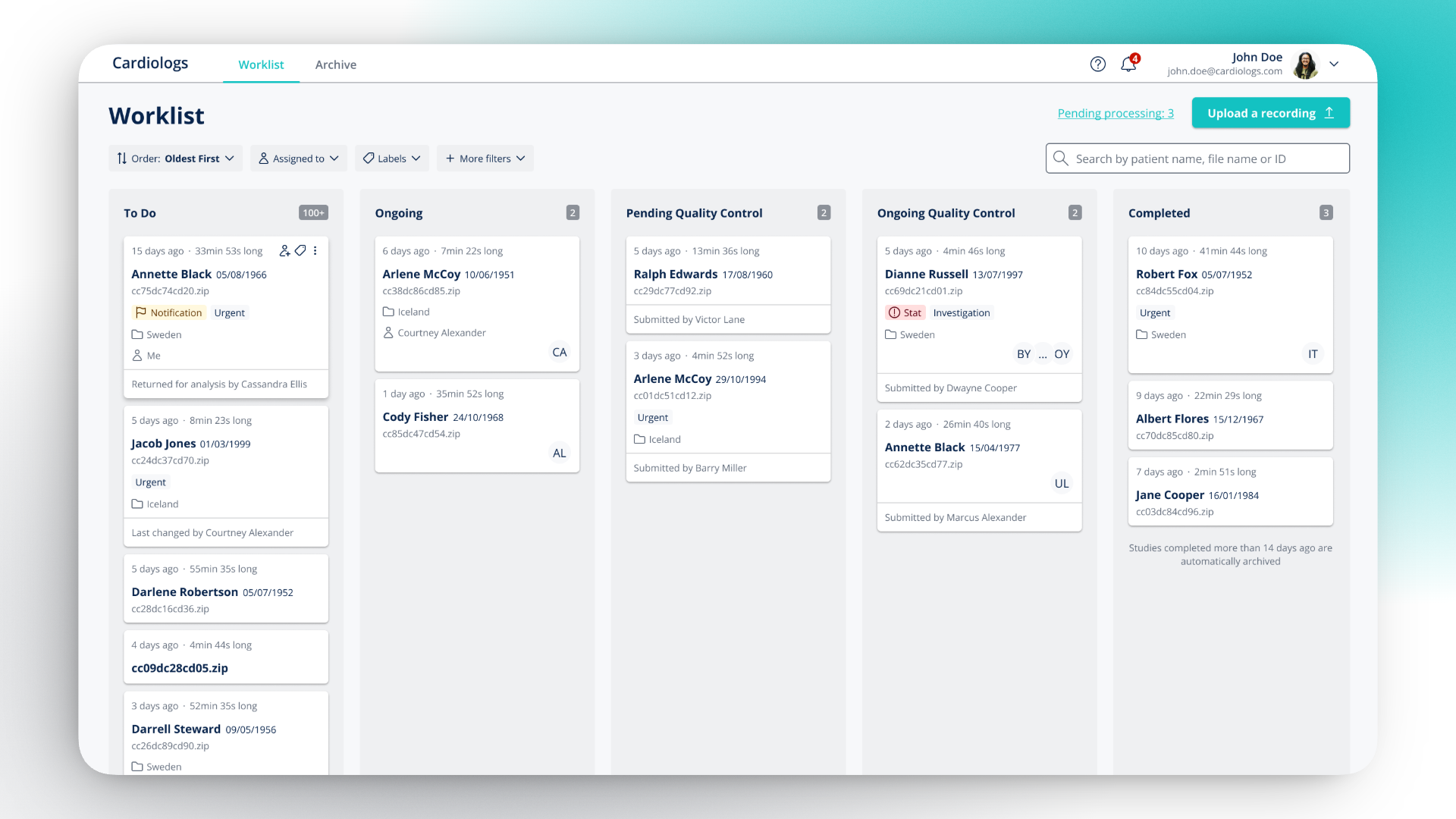
The research revealed that the real issue wasn't the view type but how information was displayed. I redesigned the triage list around the real clinical process, and the prospect chose our solution over the table they had originally requested.
Context & Existing Feature
Cardiologs is an AI-powered platform that helps cardiologists and electrophysiologists analyse long-duration ECGs (Holter monitors, 1 to 30 days). The AI automatically detects and categorises cardiac arrhythmias, allowing physicians to review cases faster.
When a cardiologist logs in, they land on the Worklist — a triage list where they manage every patient's recording. This screen is used tens to hundreds of times a day and helps hospitals, clinics and IDTFs (Independent Diagnostic Testing Facilities).
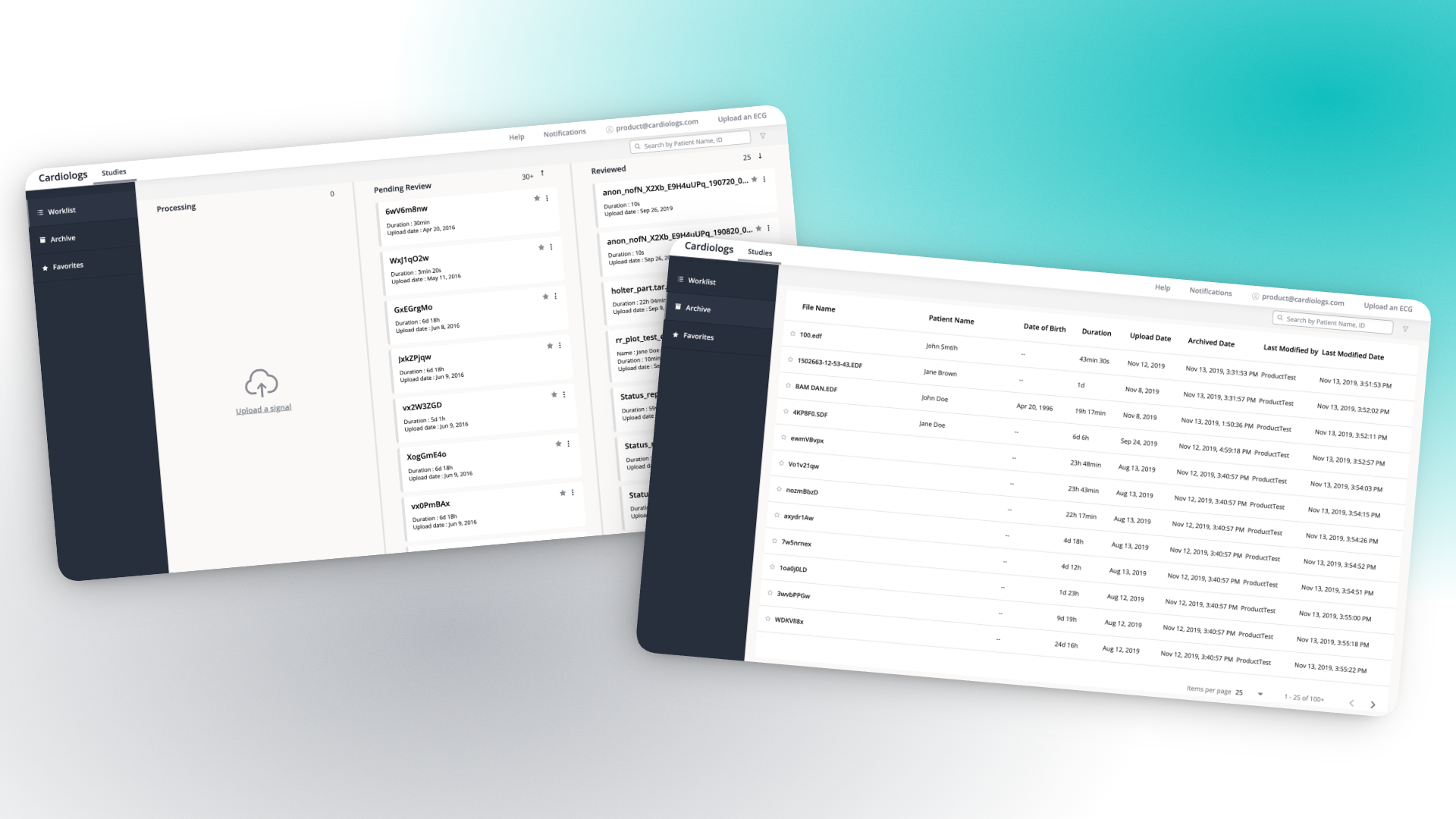
At that time, the Worklist was split in 4 different screens:
- A 3-column Kanban board: Processing, Pending Review, Reviewed
- A single screen for Quality Control
- An Archive with all holters reviewed and older than 14 days
- Favorites with starred ECGs
The Starting Point
A major prospect requested adjustments to use our platform: turning the Worklist from a Kanban view to a list view — something closer to what they were used to in their previous software.
Before doing any modification, 2 things stood out:
- The request was motivated by familiarity rather than needs. The prospect wanted what they knew. Which made sense from a commercial perspective — but it also meant the underlying problems hadn't been articulated yet.
- At the same time, the existing Worklist had its own limitations: critical information scattered across screens, cards with minimal information, and the Quality Control step was hidden.
I proposed we talk to the prospect and our existing clients first.
Research
I interviewed 3–4 clinicians and IDTFs across the prospect's team and existing clients, focusing on how they actually worked through their daily caseload.
Key findings:
- The triage process had more stages than the Worklist reflected. Cardiologists had five real stages, not three.
- Cards didn't carry enough context to triage effectively. Physicians needed patient name, date of birth, recording duration, urgency labels, and assigned reviewer — at a glance.
- Favorites were unused. Data confirmed no real users were using this feature.
- Filtering and sorting were essential but too hidden. With 100+ cases in the queue, sorting by oldest first or filtering by assignee was critical.
Two Directions, One Presentation
Based on the research, I designed two versions:
- A table view — what the prospect had envisioned, enriched with the information gaps we'd identified
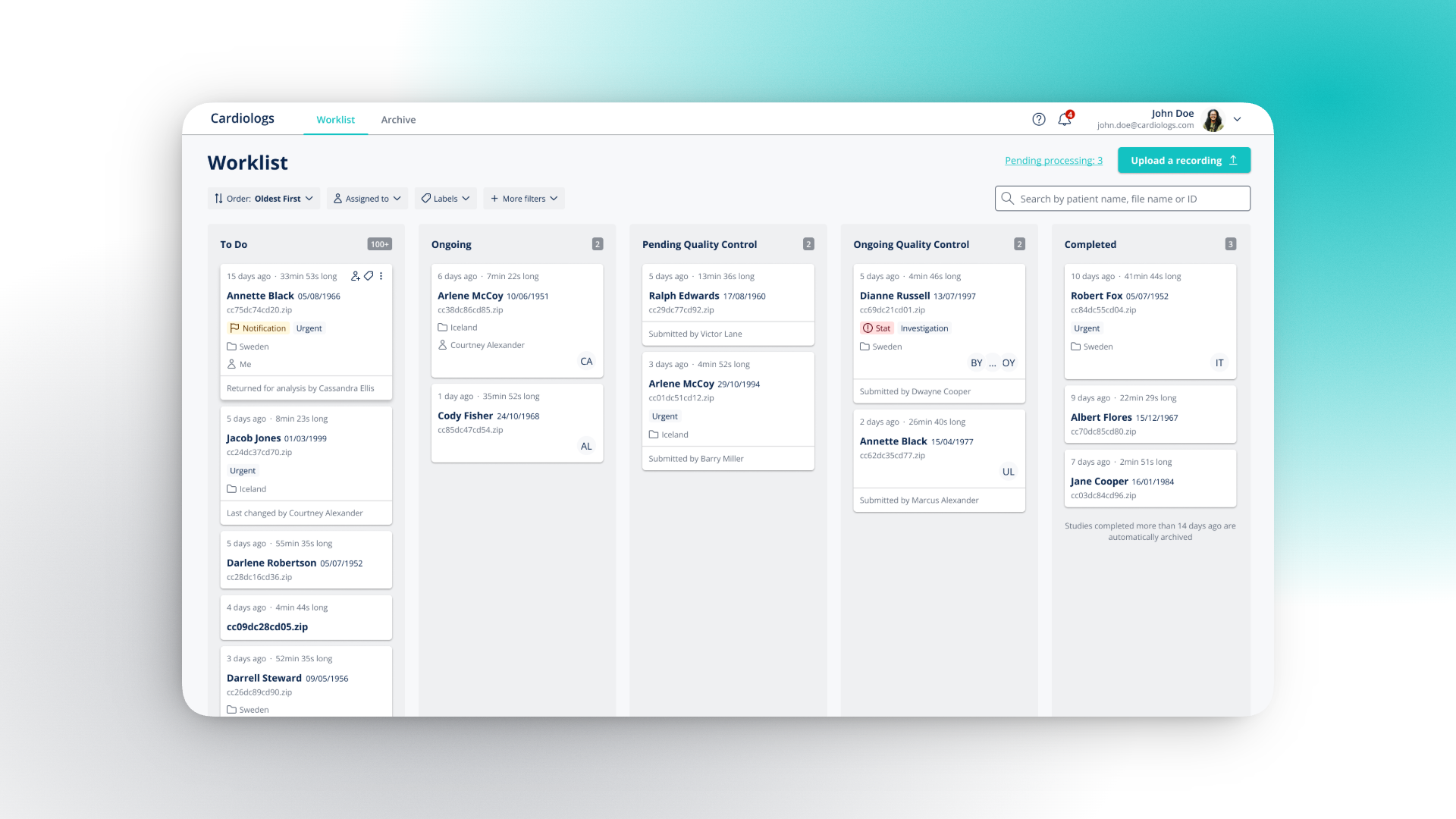
- An improved column view — a five-column board reflecting the real triage process, with richer cards, filters, and Quality Control integrated directly
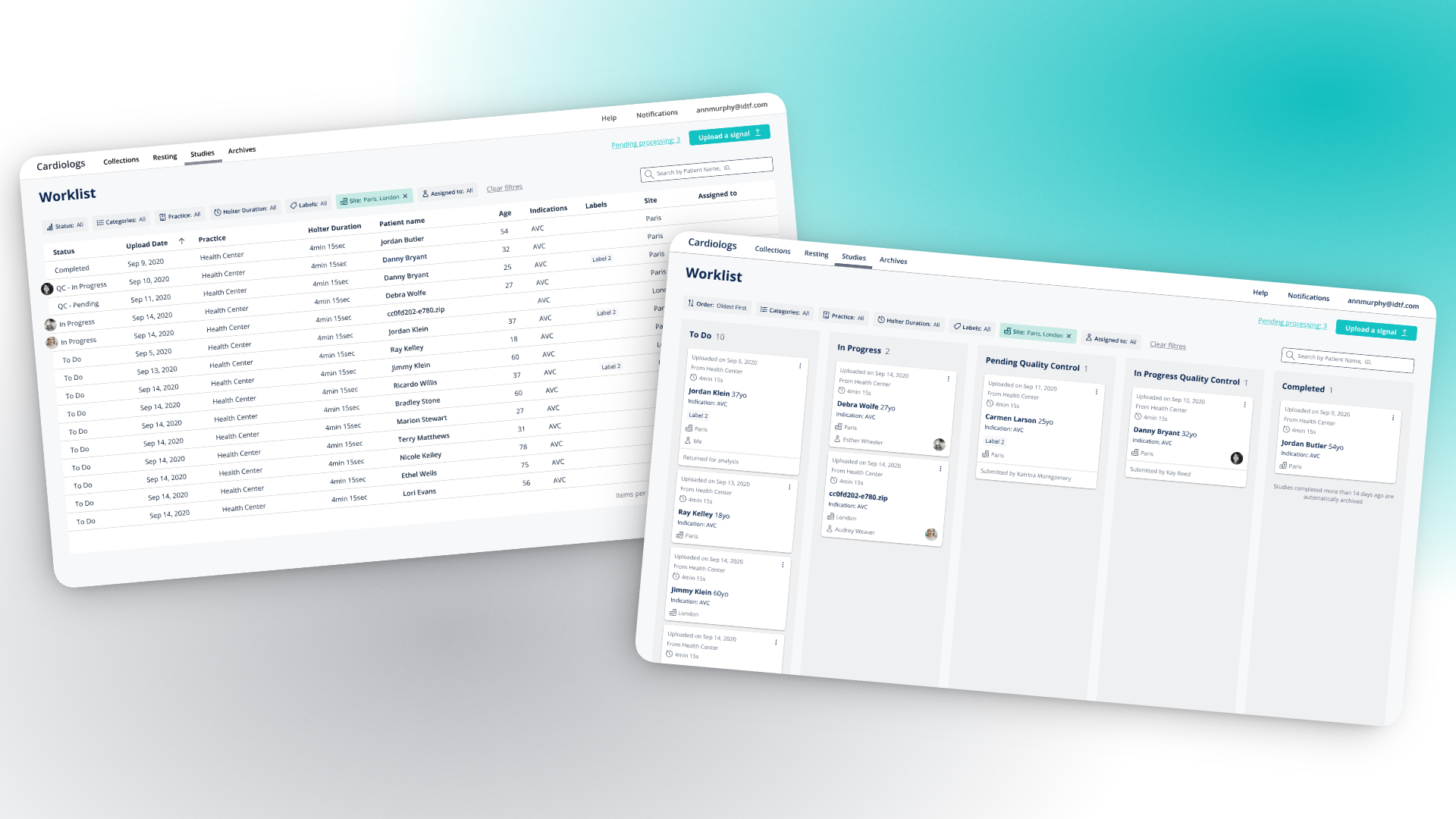
We presented both solutions to the prospect with animated prototypes. Seeing the two options side by side, the prospect realised our Kanban view matched the process of clinics and IDTFs and would improve productivity. The five stages matched their actual workflow.
What We Shipped
We delivered the redesigned Worklist in two phases over 8 weeks:
Phase 1 — The container. The column structure expanded from 3 to 5 stages: To Do → Ongoing → Pending Quality Control → Ongoing Quality Control → Completed. Filter bar, search, and a clear "Upload a recording" entry point. Favorites removed. Archive became a simple tab.
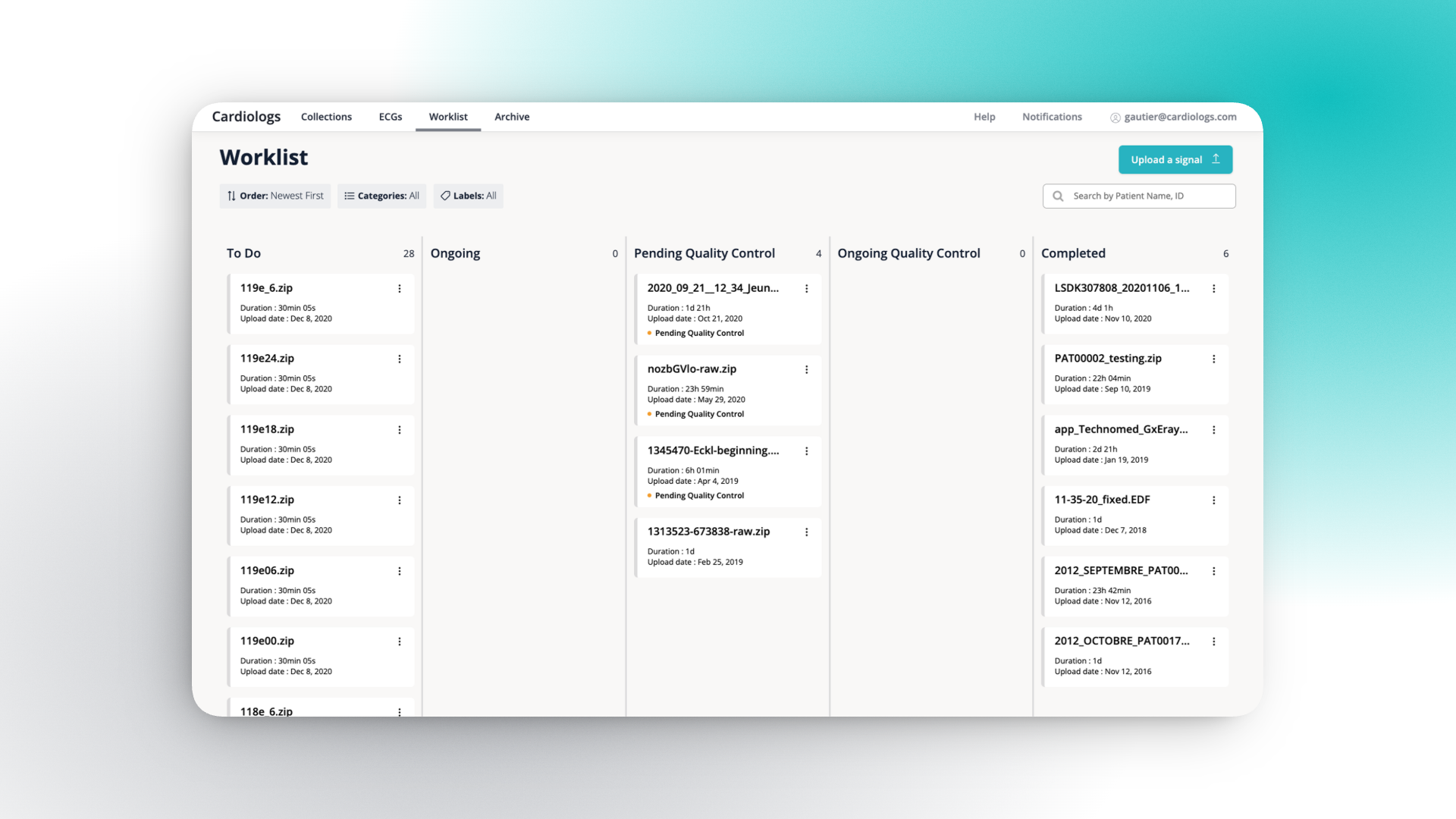
Phase 2 — The content. Each card was redesigned to surface the information cardiologists need: patient name, date of birth, file ID, recording duration, upload date, urgency and status labels, country, assigned reviewer, and last action taken.
Outcome
The prospect signed. The redesigned Worklist contributed to closing the deal.
We never had to touch this screen again. After launch, the triage list worked for everyone — no complaints, no iteration needed. For a screen used tens to hundreds of times daily, that silence is the strongest validation.
One solution served all clients. Rather than maintaining a separate view for one account, every client benefited from the same improved experience.
What I'd do differently
I would have pushed to instrument the Worklist with analytics from day one — tracking time-to-first-click, filter usage, column dwell time — to build a data foundation for future improvements.